all solution computer and internet

double your website earning 100%

double your website earning 100%

Tuesday, December 1, 2015

bypass facebook photo tag id verification new working method

bypass facebook photo tag id verification new working method

bypass facebook photo tag id verification new working method

Many people are still finding the working method for bypassing photo tag verification. Now i has been found this working tricks. Its just working for android and iphone users. you can find many more online verification but most of them will not work. identity verification is also play very important role to prevent from this type of id verification.

what is the reasons of facebook photo tag id verification?

  1. If some of people report your profile then you have to face facebook id verification.
  2. When you add much more friends without knowing any one.
  3. When your post not follow terms and condition of facebook.
  4. If facebook ambiguity for illegal activity on you profile then you have to face id verification.
  5. When you forgot your password and unable to solve with email verification.
  6. If you login you fb account from authorize app.

how to protect account from facebook photo tag verification?

  1. You must be complete your about section.
  2. You must be provide your real using phone number.
  3. You should avoid for adding unknown friends.
  4. You should be increase your privacy and security section.
  5. You have to add 3 trusted friends from security section.
  6. You should be turn on login approval message. you can enable it from security setting.
If you have to face any problem you can contact with us with facebook, skype, email

Method of verification

1. You will have to download "tunnelbear" and install it on your iphone or android phone from plays store and app store.
Click here Android user
Click here Iphone user

2. Now make an new account on it.

3. Change your location at japan.

4. After that you can login your facebook account.

5. Now its show only catcha code. enter the correct code.

6. Now its show a phone verification. just change your country code japan to Pakistan.

7. You got a confirm code on you mobile phone. And enjoy your account.

NOTE: this is working with only 1st and last chance.

Posted By: plastic market on Tuesday, December 1, 2015

Monday, November 30, 2015

how to hack or locked secured wifi password WPS/WPA only

how to hack or locked secured wifi password WPS/WPA only

how to hack or locked secured wifi password WPS/WPA only

Currently I am Rear Using Nearly all Desired WI-FI Hacking Application, That can Really Impress. in Using its Functions And Capacity In order to Hack into WI-FI System Properly. Which Application Will probably Enables you to Crack Almost any Wpa/Wps Made it possible for WI-FI Networks. Now Without having Losing Anymore Time period Appear Why don't we Head to Real Steps Make use of This specific WI-FI Application.

NOTE: you must be know
1. Your phone must be rooted.
2. This wi-fi hacking work only for WPS/WPA not for WPA or WPE.
3. Some times it does,t work due to long distance from router.
4. You must be play with your own router not for public and another one.

WARNING! This is only for your educational knowledge. If you used it for any illegal purpose. you have to face many problems. because its totally illegal


Follow the bellow given steps


1. To be able to Crack Wifi System You have to Download “Wifi Wpa Wps Tester” Download App Through Here.

2. Next Activate Your Wifi. As well as Check For available Wpa/Wps Wi-fi.

3. Whenever you Observe available Wifi System Next Open up “Wifi Wpa Wps Tester” App.

4. At this point You have to Select green Color Reffresh Option And yes it Will show you All Readily available Sites There.

5. At this point Just click Upon [Green Colored Key Locker] Image In addition to Select Make an effort to Connect System Solution.


Now its show lock like bellow given screen shot.


if you have to face an any problem you can ask any question and share your problem we try to solve. Thanks and always remember in your pray.

keywords for more users

crack wifi password from android.
wifi hacking app.
how to use “Wifi Wpa Wps Tester” App.
how to hack wifi with simple easy steps.
wifi hacking tricks or app for rooted users.
easy way to hack wifi from android.


Posted By: plastic market on Monday, November 30, 2015

Friday, November 20, 2015

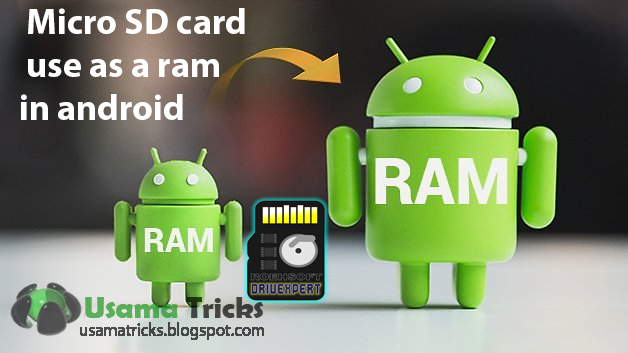
how can use micro sd card as ram to increase speed android

How can use micro sd card as ram to increase speed android

how can use micro sd card as ram to increase speed android

Your own Android os system almost certainly included 16GB connected with storage devices, however it’s the particular RAM that really influences you skill about it. Nearly all high-end Android os devices ship using 2GB and up connected with RAM, but some less expensive devices will often have simply 1GB connected with RAM or perhaps 512MB now and again. all method with full working as well as. convert sd card into ram

Major reason to get more RAM

The benefit connected with more RAM are not overstated. Although far more hard drive will have more pictures, Tunes, or maybe more movies, more RAM assists the particular cpu to be effective work more speedily, in so doing assisting within the playback (or possibly creation) connected with this kind of files.

For instance, many playback problems are generally wrongly blamed using a slower Internet connection, while in fact they may be speedup in place with more RAM, as opposed to faster instant.


Several tips occur to improve functional RAM on your own Android mobile phone gadget through “cleaning up”. We’ll think you’ve previously attempted these people, and search here at the best way to truly in physical form increase offered RAM. 


METHOD 1: using android app

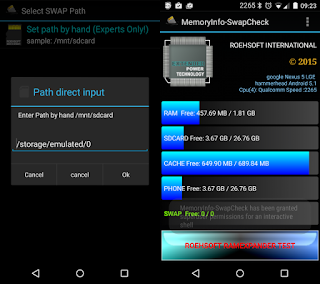
Below i will describe an individual ways to raise your current phone’s MEMORY by employing quality Roehsoft MEMORY Expander(Swap) app. This app has very important purpose within the partition from the storage / Facts for making use of that since MEMORY. Following accomplishing this storage device works since virtual RAM for the Android mobile phone.

before doing next step you must be check that is your device able or not?
click here for checking app


How to use Roehsoft MEMORY Expander (swap) app?

  • Set up this request on your product where you want to raise RAM MEMORY.
  • Currently immediately after that in this  request for your select current default language.
  • Currently to improve RAM MEMORY make a SWAP report by means of simply clicking this SWAP Active as well as allowing the idea.
  • Following procedure is completed only click on the grey tinted box as well as activate this swap report designed.
  • How exciting you could have properly increased this RAM MEMORY of this Android os mobile phone.
That increased ram memory won't indicate from the activity boss nevertheless, you can certainly feel the alter with the efficiency in the product which in turn is improve way up. If you currently have a considerable ram memory these acquired may need to operate a number of quite major sport to learn this change inside overall performance. I really hope that submit assisted a person inside raising this RAM MEMORY of this Android os mobile phone.

METHOD 2: manually from PC

Required:

1. Micro sd card
2. Rooted smartphone, tablet or any android device
3. Computer(PC) with windows OS
4. Card reader to connect sd card with pc

Before doing next step you must be check that is your device able or not on your android?
click here for checking app

1st step

1. Download your "mini tool partition wizard" by CLICK HERE

2- Insert your micro SD card into your computer or laptop.

3- Now run mini tool partition and format your external memory card .

4- Now Help make partition simply by  simply right click your current memory card. Choose the partition because principal along with record technique because FAT32 regarding greeting card over 4GB.

5- Keep approx 1 GB storage regarding subsequent partition.

6- Then pick out completed along with once more simply click on make partition selection, select a primary partition, but modify the system file to EXT2, EXT3 or even EXT4.


7- Simply click to utilize modifications and you possess concluded partition on the memory.

2nd step


1. Download Link2SD through google play store.


2. Kick off the app and present root agreement. Choose the “. ext” partition.

3. Start out linking these individuals.

3rd step

1. Download Swapper for Root on android.

2. Release the actual application and select the number of MEMORY(RAM) you need to boost.

3. It will create a. swp file and it raises the actual MEMORY(RAM) of one's Android os System.

if you have to face an any problem you can ask any question and share your problem we try to solve. Thanks and always remember in your pray.

Posted By: plastic market on Friday, November 20, 2015

Tuesday, November 10, 2015

how can use whatsapp in java mobile (nokia asha)

how can use whatsapp in java mobile (nokia asha)

how can use whatsapp in java mobile (nokia asha)

In the following paragraphs I will tell you how you can down load in addition to install whatsapp with regard to caffeine mobile phones. Underneath, I am discussing a link for you to down load WhatsApp with regard to Caffeine Devices which will manage throughout just about all caffeine mobile .mobile phones using giant screen (having a minimum of 240×320 tv screen dimension, can’t declare something regarding different screens).
It truly is 100% operating in addition to tested by myself with some nokia mobile phones
like Asha 190, C2-03, and so on. Consequently without having throwing away occasion just click with underneath connection to down load WhatsApp with regard to caffeine cell phone in addition to remark underneath for you to ok, i'll know if it's in your own cell phone as well as notNote: This can certainly not help samsung mobile phones since samsung mobile phones do support some caffeine applications but in fact they've Bada OS.

follow the following steps to download and install

1. download the bellow given both files (WhatsApp_Messenger.jar and WhatsApp_Messenger.jad) in computer or laptop (PC).

click to download "WhatsApp_Messenger.jar"

click to download "WhatsApp_Messenger.jad"


2. connect you java mobile with computer through data cable.

3. copy both files in same folder on mobile phone. you must be copy in same folder otherwise it does't work.

4. now you can run and enjoy whatsapp in java mobile


if you have to face an any problem you can ask any question and share your problem we try to solve. Thanks and always remember in your pray.

Posted By: plastic market on Tuesday, November 10, 2015

Saturday, November 7, 2015

how can combine or merge facebook profile and cover photo

how can combine or merge facebook profile and cover photo

how can combine or merge facebook profile and cover photo


this tricks is very easy and fantastic you can easily make your profile attractive with only some steps:

1. Open up TrickedOut timeline click here  Website inside your COMPUTER SYSTEM Visitor.
2. Trickedout timline internet site present you with several forms of blend intended for Fb Handle with user profile Snapshot. Choose ones most liked a single options and after this anyone decide to assimilate ones FACEBOOK user profile with Fb protect.

how can combine or merge facebook profile and cover photo


3. now chose and upload which photo that's you want to make you timeline photo


how can combine or merge facebook profile and cover photo


4. now you could resize and select a part of your image.
how can combine or merge facebook profile and cover photo

5. now its show a download button of both cover photo and profile picture you can easily download from here.


how can combine or merge facebook profile and cover photo

if you have to face an any problem you can ask any question and share your problem we try to solve. Thanks and always remember in your pray.

Posted By: plastic market on Saturday, November 7, 2015

Contact Us

Name

Email *

Message *


Latest post

About Us

alexa rank

Copyright © . Usamatricks.blogspot.com. All Rights Reserved.
Usama Tricks
Usama Tricks